
One of the most recommended practices for teams building digital products that want to reach 99.999% availability is to track application and service versions and deepen their understanding of the dependencies between them. This practice is part of good old – though often overlooked – Configuration Management.
A Resilience Matrix is a tool that displays the applications and services of a given product and connects every application to its dependencies. But it doesn't stop there: it also lets you see the level of impact on an application caused by failures in each of its dependencies. That makes it possible to identify and fix what is actually causing a problem for a customer much faster.
The challenge of monitoring in the cloud
In the not-too-distant past, companies usually had a limited number of infrastructure resources in their on-premises environments, with static architectures. Once monitoring was set up for those applications, the idea was that it wouldn't need frequent updates.
Fast-forward to the present, though, and many cloud-native applications were built in 2020 while traditional applications ended up being reworked to take advantage of the cloud. Now that architectures have become elastic and distributed, monitoring has become a huge challenge of tracking moving targets. Some applications run on IaaS (Infrastructure as a Service) deployments; others run as PaaS (Platform as a Service) components, and a growing number of applications are acquired as SaaS (Software as a Service) offerings.
How do we deal with this?
There's a famous saying in the Cloud/DevOps world: “Treat your servers like cattle, not pets”.
The image below illustrates it well:

After all, nobody can drive a herd by calling each cow by name. It would be humanly impossible.
If you have to look after several pets at once, you can get to know and interact with each one of them without much trouble, right? That's what system administrators were able to do with their servers in the pre-cloud era.
However, if you need to manage hundreds of components that keep your product running – like someone driving cattle, as in the example above – you'll need to learn new techniques, such as monitoring and distributed tracing. The good news is that, with just a few configurations and conventions, you can maintain hundreds or even thousands of smaller components.
Since transactions now happen in multiple places, the monitoring process must be able to trace and aggregate each step. Log management has also changed a lot, since many machines and containers have short lifecycles. The standard logging process now involves centralized logging with stacks such as ELK or Graylog, among others.
The combination of these new tools and processes is often called “Observability”, because it represents much more than simple monitoring. We'll be talking a lot about it on this blog.
Products, applications and services
But before we go further into monitoring, it's essential to align on semantics and explain how we define each of the elements that make up its structure.
A Product is something a company offers to its customers, or perhaps to an internal group of employees. It has business meaning and is usually made up of several applications and services.
An Application is something the company develops in-house (perhaps with the help of partners or contractors) to create value within the context of a Product. It usually improves over time and receives frequent updates through bug fixes and new features. Applications usually depend on Services to work.
A Service is something the company uses to build Applications. It can be an infrastructure service such as a database, or something more sophisticated, such as a Pricing API.
While servers, containers and other technical components change very frequently in cloud environments, products, applications and services change far less. They're also much more relevant to customers, so it makes sense to monitor them rather than the underlying moving parts.
ITIL best practices recommend using a Configuration Management Database (CMDB) to manage servers and other types of devices, which are usually tied to legacy on-premises environments. Most of the ideas behind those practices are still relevant in cloud environments, given a shift in mindset.
After all, you can manage environments, Applications, Services and other relevant entities in an Application and Service Catalog. And managing the application lifecycle becomes much easier with good-quality information available in the Catalog.
Health Checks
When the focus is on high-level components such as Applications, you need effective routines to check that everything is working as it should. Think of an airplane, where we obviously want to be sure that everything is working in perfect condition, filtering out any surrounding noise.
This is done through application health checks. Put very simply, running a health check is a way of verifying that an application is running well and without problems. Applications should be built with the concept of Observability in mind, which makes it easier to find out whether something needs to be done or not.
Let's look at a practical example. When a health check runs, an application should communicate with each of its services in the same way it does all the time; if it needs data from a database, it should try to fetch data from that database. If it needs to send email to customers, it should try to send a simple email to a real address. That way, if we run into any kind of problem, the health check will tell us immediately which check failed.
What the matrix looks like inside the platform
On the Elven Platform, this classification stops being a document and becomes configuration: each critical component in the matrix gets its own monitors, its own alert threshold and its own on-call route. Whatever sits on the most critical axis of the matrix is what wakes someone up at three in the morning; the rest waits for business hours.
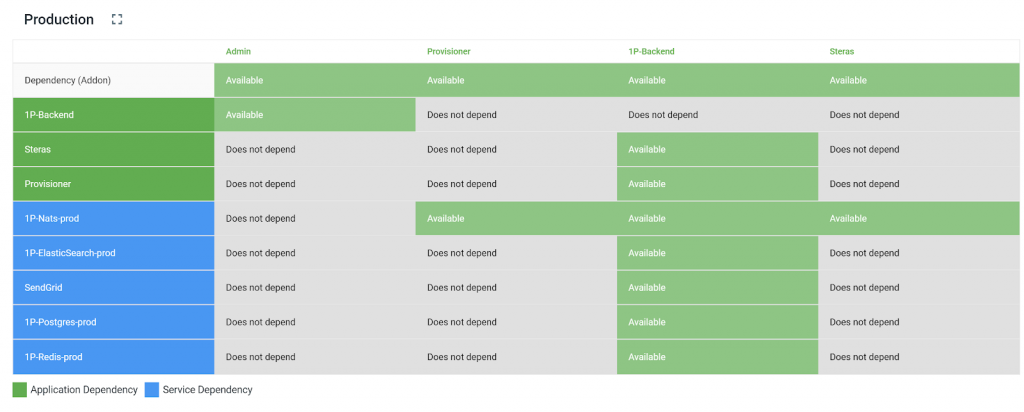
In this example, we have 4 applications, in columns:
Admin
Provisionador
1P-Backend
Steras
In each row of the Matrix, we can see the Application and Service dependencies. Let's pick the 1P-Backend application to describe its dependencies:
1P-Nats-prod: infrastructure service
1P-Elasticsearch-prod: infrastructure service
Sendgrid: external service
1P-Postgres-prod: infrastructure service
1P-Redis-prod: infrastructure service
One interesting thing about the Matrix is that it makes it easier to check what might be causing a specific problem in the system. So when an incident occurs, we can instantly check whether any dependency is also failing, and speed up troubleshooting, all in real time and within seconds.
Each cell of the Resilience Matrix holds 1 of 3 options, depending on the impact a dependency has on the applications associated with it:
Available: when the application tolerates failures in the dependency with no relevant impact on its customers
Degraded: when the application can still operate partially, but is missing part of its usual behavior. Example: when YouTube stops rendering thumbnails but keeps playing videos
Unavailable: when the application can't serve its purpose
There are some techniques applications can use during failures, such as the Circuit Breaker pattern. However, how to design a system to handle failures and build resilient applications are topics for other articles we'll cover on this blog in the future. So subscribe to our newsletter and stay tuned! 🙂
So how do you optimize health checks?
Once you know the dependencies, you can improve health checks to validate them properly. Since each service is monitored independently, the OnePlatform health check can validate that each application successfully uses the corresponding dependency.
One example would be running a query against the database, or trying to write to and read from a cache service. By doing so, you can be sure that credentials and the network are also working without problems.
Taking the 1P-Backend application as an example again, a health check payload would look like this:
{
   "1P-Nats-prod" : "OK",
   "1P-Elasticsearch-prod": "OK",
   "Sendgrid" : "ERROR",
   "1P-Postgres-prod" : "OK",
   "1P-Redis-prod" : "OK"
}
We have several key-value attributes, one for each dependency, and simple values such as “OK” and “ERROR” to describe whether or not the application is able to use the dependency. In this example, the only failing dependency is Sendgrid.
That doesn't mean Sendgrid is down for everyone; it might just be a problem with the account. What matters here is that transactional emails are probably not being sent, since the dependency that handles them is returning errors to the application.
This approach to health checks is recommended for every application, because of its simplicity and the gains it brings to diagnosis and troubleshooting.
The Resilience Matrix across an organization
While a Matrix with a handful of applications and services is relatively easy to understand, the task can become much more complex when there are dozens or even hundreds of apps and services in the same matrix.
However, product teams don't usually manage that many applications and services. Typically, for a given Product, you'll need only one or 2 matrices to show it in full. Across an organization, you may have many matrices if you have many product teams, but each matrix will be focused on a specific domain.
If you'd like to apply the techniques described in this post with your team, feel free to get in touch with us!
From matrix to operations
The matrix is only worth the time it takes to build if it turns into configuration: components classified as critical need finer-grained monitoring, alerts with their own on-call route and a declared SLO. Without that translation, the exercise stays on a slide and operations keep treating everything with the same priority.
Want to turn your criticality matrix into real alerts? Talk to the Elven team.